 USD
USD TZS
TZS UGX
UGX ZAR
ZARcPanel is a web-based control panel used to manage hosting features such as email accounts, files, databases, domains, and backups. This guide explains all common ways to log in to cPanel.
Method 1: Log In Using Domain Name (Recommended)
-
Open your web browser
-
Enter one of the following URLs:
or
-
Enter your cPanel username
-
Enter your cPanel password
-
Click Log in
Method 2: Log In Using Server IP Address
Use this method if your domain is not yet pointing to the server.
Example:
Login using the same username and password.
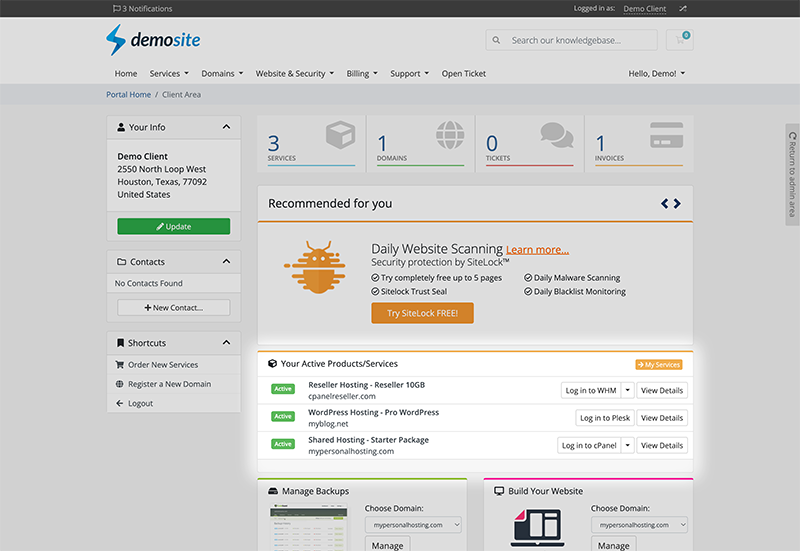
Method 3: Log In via Web Hosting Client Area
-
Log in to your hosting provider’s Client Area
-
Go to Services → My Services
-
Select your hosting package
-
Click Login to cPanel
✅ This logs you in automatically without entering credentials.
Method 4: Log In from Web Hosting Welcome Email
When you purchase hosting, your provider sends a welcome email containing:
-
cPanel URL
-
Username
-
Password
Click the cPanel link in the email and log in.
Default cPanel Login Details
-
Username: Provided by your hosting provider
-
Password: Provided or set by you
-
Port:
2083(secure SSL port)
